Home › Forums › The XBRL API › Extending search: adding terms and using Additional Parameters
- This topic has 1 reply, 2 voices, and was last updated 3 years, 3 months ago by Aaron Stout.
-
AuthorPosts
-
-
Wednesday, July 26, 2023 at 7:39 AM #212190David TaurielloKeymaster
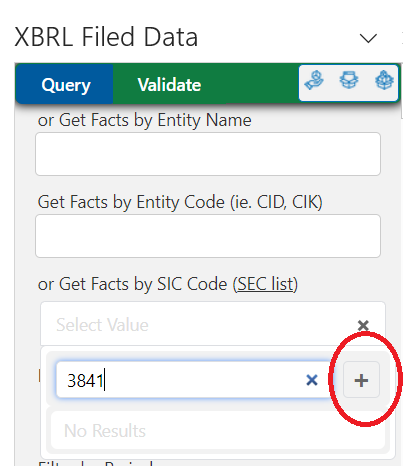
An XBRL API user writes: I am having an issue though getting a complete list of SIC codes in the “or Get Facts By SIC Code (SEC List)” field. I ran a query for a company via entity name then tried to search for similar companies in the same SIC but it doesn’t show up. I only see a list of 10 SICs. Any suggestions on how to search for all companies in SIC 3841?
Thanks for writing – the SIC field supports any 4-digit code that a filer has disclosed on the submitted report. Add any 4-digit SIC to the search field by clicking the + to show a text box, entering the code, then clicking the + that appears to the right of the text box (throughout the add-in, the text box is multi-purpose – it searches existing options and adds new ones).

Most of the search parameters in the XBRL API support multiple attributes – these are separated by commas (
report.sic-code=3841,3571) and function as “OR” options.Also – nearly any attribute listed in the ‘Fields to Return’ is searchable. We kept the default options to a minimum for simplicity and added the ‘Additional Parameters’ field on the task pane to support deeper queries.
For example, a filter like
concept.is-base=FALSEadded to the the box for a fact query will return only extension concepts (not in base taxonomies – US GAAP, IFRS, FERC eForms, etc.).Additional Parameters can be combined using the & character (
concept.is-base=FALSE&concept.is-monetary=TRUEreturns extension concepts that are monetary). -
Wednesday, July 26, 2023 at 1:06 PM #212198Aaron StoutParticipant
Very helpful. Thank you!
-
-
AuthorPosts
- You must be logged in to reply to this topic.
Search Forums
Recent Topics
Recent Replies
-
Getting started with the XBRL Google Sheet and add-on 3 weeks, 5 days ago
-
Income Statement data for a company 1 year, 4 months ago
-
Income Statement data for a company 1 year, 4 months ago
-
Using the offset parameter 1 year, 8 months ago
-
Using the offset parameter 1 year, 8 months ago
Documentation & Discussion
- Get started with Google Sheets OR
- Get started with Microsoft Excel OR
- Get access to as-filed data from us for other tools or your own app
- XBRL API Interactive Documentation
- Ten Tips & Techniques
- The XBRL API
- XBRL Data Community
- 2026 US GAAP Taxonomy Viewer
- Live support - Monday, 3:30 - 4:30 PM ET
Who's using this free data?
API Use 2026 || API Use 2025 || API Use 2024 || API Use 2023 || API Use 2022 || API Use 2021 || API Use 2020 || API Use 2019 || API Use 2018
Join XBRL US
- Individual Options - Basic, Power User & Sole Practitioner
- For Your Team - Startup, Non-Profit, Academic & Corporate options
- Member Benefits Comparison Table
Using the XBRL API with the Public Filings Database
Unless otherwise agreed to in writing, any and all use of the XBRL API to authenticate and retrieve data from the XBRL US Database of Public Filings implies user consent and agreement with the XBRL US API Agreement. If you are unable to agree to these terms, do not use the XBRL API.
To use the XBRL API outside of Google Sheets, your account needs to be provisioned for OAuth2 access.